


 5194
5194
Background
The HIC Form is the internal data communication tool used for the annual Housing Inventory Count (HIC)/Sheltered Point-In-Time (PIT) Count. The form contains information about how a project operates, its current funding and its bed inventory, based upon data in HMIS or data used for the previous year's HIC/PIT. A form for each ES, TH, RRH, PSH, and OPH project will be created and sent (via an email "ticket" from the HMIS team with links to each form) for all relevant agencies, both participating in HMIS and not participating in HMIS.
Review the 2026 HIC and Sheltered PIT knowledge base article for more information about the HIC and Sheltered PIT process. Review the Housing Inventory Count (HIC) page to see data from previous years.
Agency Action Items:
- Participating and non-participating agencies will review these forms, update the data as necessary and submit to the OC HMIS Helpdesk. If a form was not created for one of your projects, please reach out in the ticket from 211OC.
- Agencies participating in HMIS with Emergency Shelter Entry/Exit or Transitional Housing projects must submit the ES Entry/Exit, SH, and TH Client Details report to the HMIS Help Desk in CSV format for their Sheltered PIT submission. Agencies with Emergency Shelter Night-by-Night projects must submit the ES Night-by-Night Client Details report in CSV format to the HMIS Help Desk for their Sheltered PIT submission.
- Agencies not participating in HMIS must submit the HIC Client Form for any permanent housing projects for their Sheltered PIT submission.
Within This Article
HIC Form Instructions
- 211OC will send a ticket with links to HIC Forms for each housing project that is active at the agency. Review each section of the form and make revisions so the data is accurate as of the night of the Housing Inventory Count.
- Under each data field, additional data collection details and explanations have been included.
- Fields will appear or disappear from the form depending on previous field responses. This ensures the user is only answering questions they need to answer.
- Submit the forms.
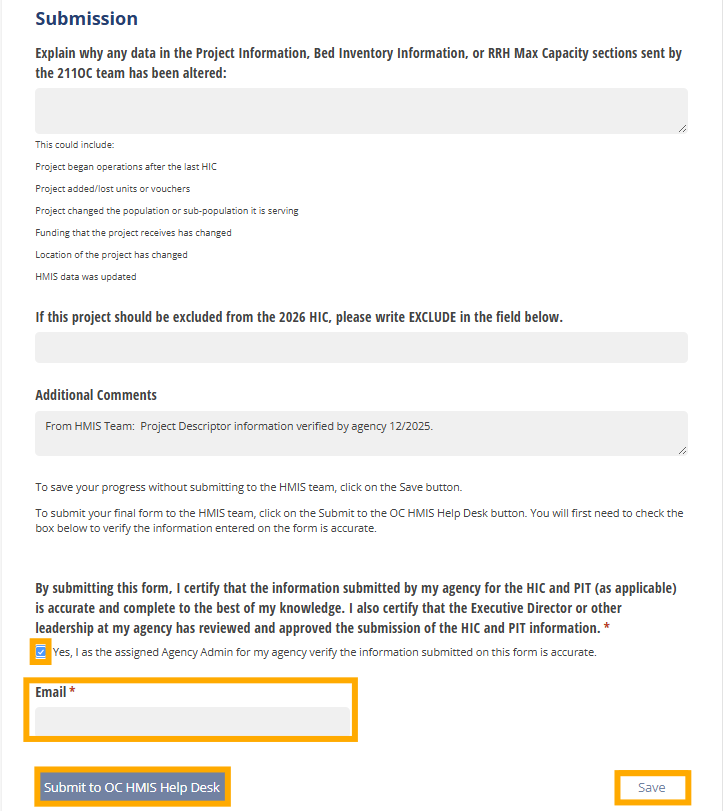
- To save updates to the form without submitting, click on the Save button at the bottom right of the screen (see below).
- To submit the final form to 211OC, enter an explanation for any revisions to the form, click on the box to confirm verification of the data, and click on the "Submit to the OC HMIS Help Desk" button (see below).
- Once the final form has been submitted, please notify the HMIS Help Desk in the ticket.
HIC Client Form Instructions
PSH, OPH, and RRH projects that do not participate in HMIS are required to provide client-level information so that bed inventory information provided on the HIC Form can be validated against client data. Data is collected on spreadsheets called HIC Client Forms (links also found in the 2026 HIC and Sheltered PIT knowledge base article). Hovering over any light yellow cells will provide information about each column on the form:

- Each non-HMIS participating PSH, OPH, and RRH project should have its own separate HIC Client Form.
- Complete each form with the required project and client information. Clients who were active in the project and in permanent housing on the night of the HIC should be listed. Clients are considered active if they do not have an exit date for the project, or the exit date is after the night of the HIC/Sheltered PIT.
- Submit the forms
- Upload your completed HIC Client forms to your agency's Dropbox folder
- Please notify the HMIS Help Desk in the ticket.

